Barcode Label Printers Overview: Printing Methods, Printer Features, Label Types and Business Applications
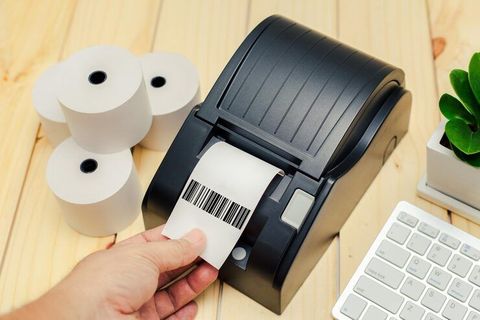
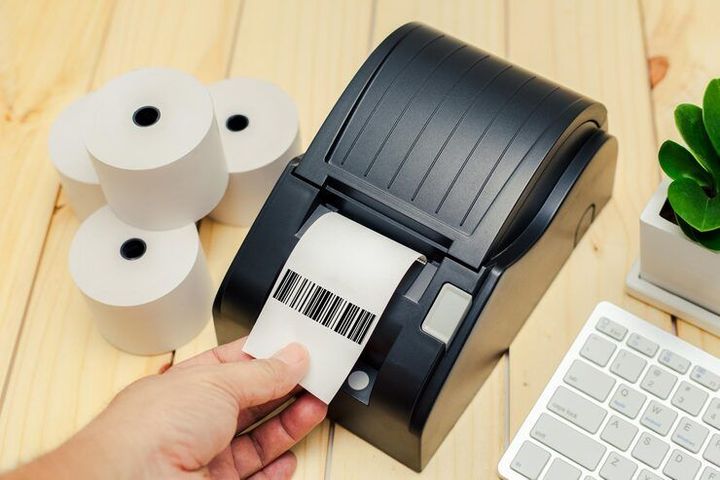
Barcode label printers are specialized printing devices used to produce labels containing machine-readable barcodes, text, numbers, symbols, and other product or operational information. They are used across retail, warehousing, manufacturing, transportation, healthcare, libraries, and many other environments where physical items need to be identified and tracked.
Context
The development of barcode labeling is closely connected with the wider adoption of automatic identification systems. Traditional printed information required people to read and enter details manually, while barcodes created a way for scanners to capture standardized information electronically.
A barcode label printer generally works with a computer, point-of-sale system, warehouse application, inventory platform, or other software. The system sends label information to the printer, which creates the required barcode and supporting text on an adhesive or non-adhesive label material.
Modern printers can produce several barcode formats, including one-dimensional and two-dimensional symbols. Depending on the printer and software, labels can also contain item numbers, batch information, serial numbers, dates, addresses, prices, handling instructions, or other information.
How barcode label printing works
The basic process begins with data. An application determines what information needs to appear on a label and sends a print command to the printer.
The printer then places the barcode and accompanying information onto the label using a selected printing method. After printing, the label can be attached to a product, package, container, shelf location, pallet, document, or other surface.
A barcode itself does not necessarily contain every piece of information about an item. It may contain an identifier that a connected system uses to retrieve additional information from a database.
Common barcode formats
Barcode label printers can support different symbol types depending on their software, resolution, and intended application.
Common examples include:
- UPC and EAN formats for retail identification
- Code 39 and Code 128 for industrial and logistical applications
- GS1 DataMatrix for applications requiring compact two-dimensional symbols
- QR Codes for applications that can use two-dimensional data structures
- ITF formats for selected distribution and packaging environments
The appropriate format depends on the information being encoded, available label space, scanning equipment, and applicable industry specifications.
Importance
Barcode label printers help organizations create consistent physical identifiers for products, materials, packages, documents, and locations. They are particularly useful where large numbers of items must be identified repeatedly.
In a warehouse, for example, a barcode label may identify an item, storage location, carton, or pallet. In manufacturing, labels can connect materials and finished products with production records, batch references, or serial numbers.
Retail environments can use barcode labels for product identification and checkout processes. Transportation and distribution operations can use labels to associate packages with shipment information and handling records.
Operational challenges addressed by barcode labels
Barcode labeling can reduce the need for manual entry when scanners are used as part of an identification process. It can also make printed identifiers easier for electronic systems to capture consistently.
The practical usefulness of a barcode label depends on factors such as:
- Correctly encoded information
- Suitable barcode dimensions
- Adequate print resolution
- Appropriate contrast
- Correct label material
- Proper placement on the item
- Compatibility between the barcode and scanning equipment
A poorly printed barcode can create scanning difficulties even when the underlying data is correct. For this reason, printing quality and verification are important parts of a barcode labeling workflow.
Printing method comparison
| Printing method | Typical characteristics | Common applications |
|---|---|---|
| Direct thermal | Uses heat-sensitive label material without conventional ink or ribbon | Receipts, temporary labels, shipping labels |
| Thermal transfer | Uses a heated printhead and ribbon to transfer an image | Product, asset, industrial and durable labels |
| Inkjet | Places liquid ink onto a surface | Selected packaging and specialty identification |
| Laser | Uses toner and a laser-based printing process | Sheet labels and document-oriented applications |
The table provides general characteristics. Actual suitability depends on the label material, environment, printer configuration, and required durability.
Recent Updates
Barcode label printing is increasingly connected with the transition from traditional one-dimensional barcodes toward two-dimensional barcode formats. GS1 has established an industry goal known as Ambition 2027, under which retail point-of-sale systems are intended to become capable of processing specified GS1-standardized 2D barcodes alongside existing linear barcodes by the end of 2027.
This development affects barcode label printers because printing equipment must be capable of generating the required symbols correctly. GS1's current guidance describes requirements for printers and related systems that generate compliant GS1 DataMatrix and QR Code formats.
Growth of 2D barcode applications
Two-dimensional barcodes can contain more information within a relatively compact area than many traditional linear symbols. Depending on the implementation, information can include identifiers, batch or lot references, expiry information, serial numbers, or links to digital information.
The transition is expected to be gradual rather than an immediate replacement of all existing barcodes. GS1 guidance indicates that linear and 2D barcodes may continue to appear together during the transition while scanning systems are upgraded.
Connected printing and data management
Another continuing development is closer integration between barcode printers and business software. Printers can increasingly operate as part of connected workflows involving inventory databases, warehouse applications, enterprise systems, and cloud-based platforms.
This integration can reduce repeated manual preparation of label information, although the actual workflow depends on the software and equipment being used.
Laws or Policies
Barcode label printing is influenced by several types of rules and technical standards, but the exact legal requirements vary by country, industry, product category, and intended application. A barcode itself is generally a method of representing information; regulatory obligations may instead relate to what information must appear on a product or package.
Organizations may therefore need to consider requirements covering product identification, traceability, packaging information, weights and measurements, healthcare identification, hazardous materials, transportation documentation, or other sector-specific information.
GS1 develops voluntary global standards used across many supply chains. Its standards specify structures and technical characteristics for various barcode systems, but GS1 standards should not automatically be treated as government laws. Applicable national or regional requirements remain separate.
Label compliance considerations
Before producing labels for a regulated application, an organization may need to establish:
- Which information is legally required
- Which barcode format is recognized for the intended application
- Whether a particular identification standard applies
- What label dimensions or placement rules are specified
- Whether printed information needs verification
- How records should be maintained
These requirements can differ substantially between industries. A general-purpose barcode label printer does not by itself determine whether a finished label satisfies a particular regulatory requirement.
Tools and Resources
Several digital tools can support barcode label creation, testing, and management.
Barcode generation software
Barcode-generation applications convert identifiers or other structured data into barcode symbols. Many can generate multiple symbologies and provide controls for dimensions, human-readable text, and label layouts.
The software should be configured according to the barcode specification being used rather than simply selecting a symbol based on appearance.
Label design software
Label-design platforms allow users to arrange barcodes, text, logos, serial numbers, dates, and other fields. Some applications can connect directly to databases so that information changes automatically between print batches.
Barcode verification tools
Barcode verification equipment evaluates whether a printed barcode meets defined quality characteristics. Verification can identify issues involving symbol contrast, dimensions, decoding, placement, or other technical characteristics.
Scanning a barcode successfully is not necessarily equivalent to formally verifying its quality. Verification may be relevant where consistent print quality is important.
GS1 resources
GS1 provides technical guidance covering barcode structures, 2D barcode implementation, and retail scanning requirements. Its 2D barcode implementation guidance describes the gradual transition toward expanded 2D barcode use and the interaction between printing, scanning, verification, and software systems.
FAQs
What is a barcode label printer?
A barcode label printer is a device designed to print machine-readable barcode symbols together with information such as item numbers, serial references, dates, addresses, or product details. It can be integrated with software that supplies the data used on each label.
What is the difference between direct thermal and thermal transfer printing?
Direct thermal printing creates an image through heat-sensitive label material and normally does not use a ribbon. Thermal transfer printing uses heat to transfer material from a ribbon onto the label surface. The appropriate method depends on factors such as expected label life, environmental exposure, and label material.
Can barcode label printers print 2D barcodes?
Many barcode label printers can print 2D barcodes, but capability depends on the printer, software, print resolution, and supported barcode formats. GS1's current 2D guidance includes printer-readiness criteria for generating compliant retail DataMatrix and QR Code symbols.
What types of labels can barcode printers produce?
Barcode printers can produce labels for products, cartons, pallets, shelves, assets, documents, packages, and other applications. Label materials may include paper and synthetic substrates, with the appropriate material depending on the environment and expected handling conditions.
How can barcode printing accuracy be maintained?
Consistent label dimensions, suitable print resolution, correct barcode data, appropriate printer settings, compatible label material, and regular verification can help maintain consistent results. Scanning tests can also identify printing problems before labels are used in larger quantities.
Conclusion
Barcode label printers convert structured digital information into physical labels that can be read by barcode scanning systems. Direct thermal and thermal transfer are widely used printing methods, while different label materials and barcode formats support different applications. The industry is also moving toward greater use of 2D barcodes, with GS1's Ambition 2027 providing a framework for broader retail adoption. Printer capability, label material, software integration, barcode specifications, and applicable regulatory requirements all influence how a barcode labeling system is designed.